
A person's controls
Agents do the work; some decisions stay a person's. This page is where those decisions live: what is waiting on you, how to answer an agent, and the controls on a card that only a person can use.
That last part is deliberate. Every control below is recorded on the plan with who and when. An agent that could approve its own issue, turn on auto-merge for its own PR, jump its own node up the queue or decide its own review's findings would make each of those a formality, so no worker and no undeclared agent can use one. Plan authoring over MCP cannot reach them either: none is part of a plan's YAML except the merge policy, and add_plan_node / change_plan_node / import_plan refuse to turn that one on.
The one exception is the plan's lead agent, the session you supervise the run through: it may relay a decision you made in your conversation with it (stoat#244). Each control has an MCP twin only it may call while its session is alive, naming you in relayFor; the decision is recorded as yours with the lead beside it, and the Activity says both ("approved for agents, relayed by net11-lead · Jeremy D. Miller"). A lead is refused on a node it holds a claim on itself. The tools are listed in the MCP reference.
Every control on a card has a key, and a plan's Table view gives and withdraws go-aheads in bulk: see Keyboard shortcuts.
Who you are
Stoat has no sign-in. Every control on this page records a name: the one in the topbar's You field, kept in this browser. Set it once; until you do, what you do is recorded as stoat-ui.
On its own machine that is all there is to it. On a server other machines reach (Stoat Team), anyone who can open the page can use every control here: there are no accounts or per-person permissions, and the name recorded is whatever that person's browser says. Keep a team server where only the team can reach it.
What is waiting on you
These places say it, and they read the same list, so they never disagree.
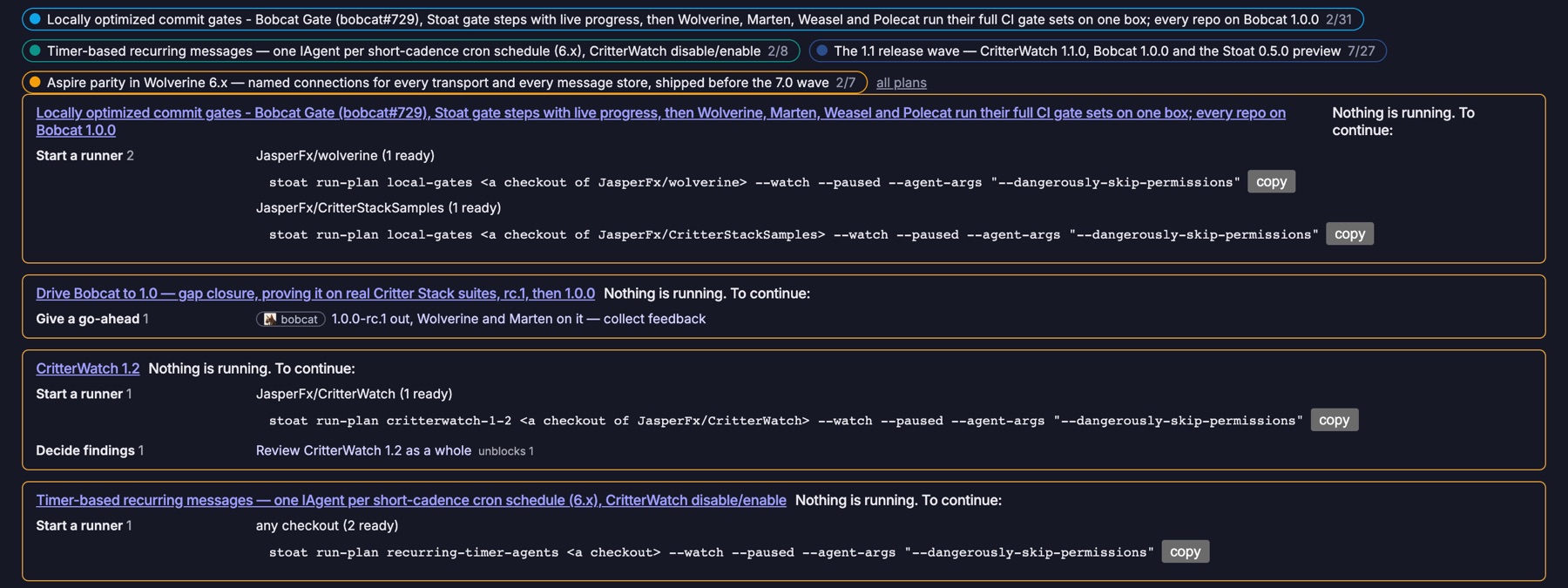 The ready board: a chip per plan with its done / total, and for each stalled plan "Nothing is running. To continue:" with what it needs from you, each need carrying its repository's icon.
- The top bar, on every page: a waiting on you count. Questions come first, since an agent is stopped on each, then go-aheads, fixes, merges and reviews. Clicking a question opens the chat below.
- The ready board's "needs a human" strip (the landing page): agents blocked on a permission prompt (from the hook sidecars), questions an agent left in its final message, stalled claims (alive, idle and holding a node), PRs open under
manual-review, and the plan runner's callouts: afixit could not get its agent to make, amergeit held,main-red, adriftconflict, acloudnode waiting for a launch, a give-up. - A plan's page: what the plan needs from you, at the top, grouped by action, with a "stalled" banner when work waits and nothing runs; and the ✋ You lens, which mutes every other card (see Reading the plan page).
- Notifications, when configured: a desktop notification, a Discord channel or a webhook for the kinds you name. On a Mac a desktop notification for each question is on by default. See Configuration.
Work through them one at a time. The top bar's ⚑ menu lists each item, and Work through them opens a queue: one item at a time, with Previous / Next (← →, or j / k). A question shows the chat, a go-ahead has Approve, a node of yours has Mark done with its brief, and anything else opens where it is handled. An item that arrives while you read never moves you off the one in front of you.
Merges are listed in the order they should land: a PR comes after every open PR upstream of it, in any plan, and one that depends on an open PR says so (after #790 (weasel-tfm): this depends on it) on the plan's needs, its card, its table row and the strip. Under manual review Stoat cannot stop a merge out of order on GitHub; it says the order instead.
A usage-limit callout is shown and never counted: it is information, and the runner resumes those agents itself at the reset (Usage limits).
Where an agent of the runner ran the node, the row carries the way back into its context: cd <worktree> && claude --resume <session>, with a copy button. A stalled or waiting agent never gets one: it is still running, and resuming it would put a second process on the same session.
Answering an agent
An agent that needs a person asks with ask_person and parks until it is answered, its lease renewed while it waits. One call parks for about four minutes at most, under the time an MCP client allows a tool call; then it answers pending and the agent calls again with the question's questionId, so a long wait is several calls on one open question. The agent says what it would do if nobody answers (recommended), which the chat shows as its default, and it is told not to carry on with that while the question is pending, unless its question said it would. A question never changes the node's status. A question on a claim dies with the claim, except that a run-plan worker that ends its attempt with one open has it carried to the plan, where it waits for you.
Clicking a question opens a chat with that agent: the question with its options and default, the agent's last report and output, every question and answer on the node so far, and a reply box. The reply goes where the question waits (POST /api/plans/{slug}/nodes/{id}/conversation):
- An agent parked in
ask_persongets it on its claim and carries on at once. - An agent that exited with a question in its final message (a paragraph starting
Question for a person:, which the runner raises as aquestioncallout) is resumed by the plan runner, in its own session, worktree and claim, with your answer as its next prompt. The callout clears as the resume starts, the chat shows the agent's log while it works and its final message as its reply, and the answer is kept on the plan's Activity. The question is kept on the plan, so the answer waits there until a runner for the node's repository is up to deliver it; one whose launcher cannot resume (codex, gemini), or a node whose worktree is on another machine, gets the question and answer in its next attempt's prompt instead. Until then the node is held rather than retried; Dismiss in the chat lets it go. An answer to a node that has gone done meanwhile has no agent to go to: the runner closes it undelivered, once, and the Activity says so. - A cloud agent asks through
ask_personor its REST twin like any other, so it is the first case. - A
fixcallout (the runner resumed the agent on its PR as often as its budget allows, or it pushed nothing) opens the chat too. Your reply resumes the agent with your words as its brief and one more attempt, recorded as yours: the one way past a fix budget, and never an agent's.
The card's ? answer answers a parked question in place, and so does the node's zoomed-in view.
A lead agent
A plan run in practice often has a supervising session working with the person. Stoat makes that role explicit: an agent takes the lead of a plan with lead_plan, and is then the first responder for its workers' questions marked needs: agent. It parks on them with await_questions, answers with answer_question, or hands one to you with escalate_question, after which it is yours for good. A question left unmarked goes to the lead while one is alive, else to a person.
- The lead is never the authority. A question marked
personis never answerable over MCP, by the lead or anyone, and the lead holds none of the controls below of its own: it relays the ones you decide (approve_for_agents,set_merge_policy,accept_partialand the rest), recorded as yours with its name beside them, and only while Stoat sees its session alive. The runner's commands (restart, start, pause) and dismissing a question stay yours alone. - Stoat decides whether the lead is alive from what it observes of the lead's session, not from anything the lead reports. A lead whose session is gone leaves no question unrouted: everything it held is a person's at once.
- The plan header shows the lead, and its × clears it (
DELETE /api/plans/{slug}/lead), alive or not. Only one lead at a time, and taking the lead is refused while another lead's session is alive. - The lead may relay your answer to an exited worker's question (
answer_questionwith noquestionId, naming you inrelayFor); the runner resumes the worker with it as above.
Stoat routes to the lead and never depends on it, and never launches one.
A lead can also work the plan itself, with no runner at all: it claims the ready nodes, does them or hands them to sessions it supervises, and keeps one conversation with you about all of it. That suits novel work better than unattended runs; see Stoat as a work queue for a lead agent.
Watching the agents work
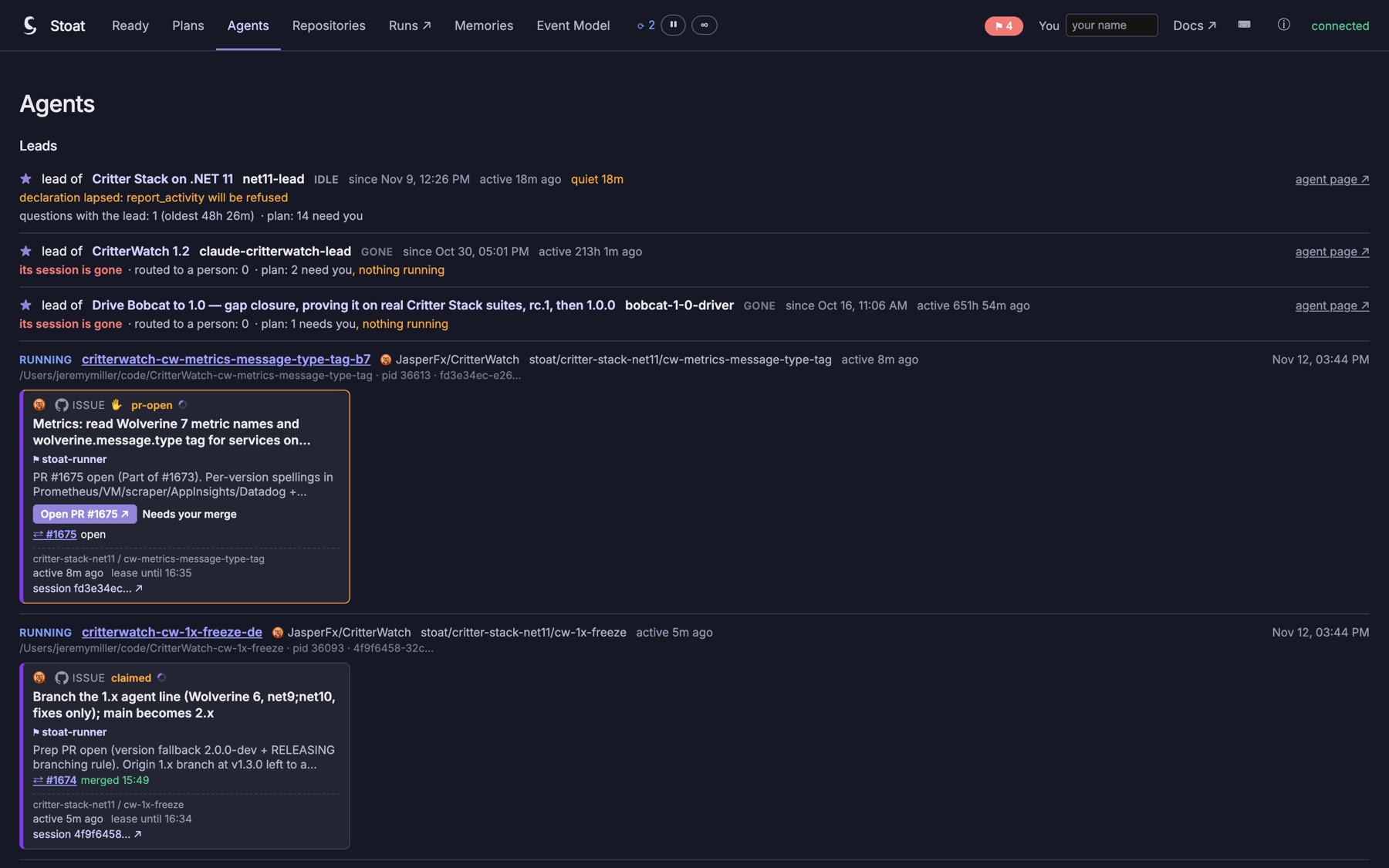 The Agents page: the plans' leads first (one alive and quiet for 18 minutes, two whose sessions are gone), then the running agents, each with the card of the node it holds.
The Agents page answers "who is doing what, and how far along is it" across every plan. Each node an agent holds is drawn as the same card the plan board draws, from the same status, so the two pages never disagree; clicking a card opens the node in place, as on the plan page. Every live agent appears once:
- Runners, grouped by plan in the plan's repository order: state, slots in use, host and pid, and a card per agent the runner is running. Under each card the runner says what it is doing with it (
attempt 1/2,rebase 1/2,fix-ci 1/2), its model, how long it has run and how recently its session did anything. A running gate step says which step and for how long, from the step's own start; a step that reports no progress says it will have an exit code only. A runner's nodes that wait on you (a give-up, a question it is not running) are one line each, not cards. - Leads: the plans a session leads, whether Stoat sees it alive, the questions with it and the oldest one's age, how many it escalated, and the plan's needs. A lead whose session runs but whose declaration lapsed says
declaration lapsed: report_activity will be refused. A lead that is gone says so, and its questions are a person's. - Sessions holding claims, then the live ones holding nothing ("no plan work"), then the ended ones, folded. An ended session still holding a claim is not folded: it reads gone, still holding until its lease lapses.
Repositories are named with their own icon where they have one, here and on the plan page, the ready board and the Repositories page.
quiet 47m marks an agent at work (holding a claim, or running) with no tool call for ten minutes or more. It is a label, never a health: whether the agent is there is still the session probe's word, on the claim. A resume command (cd <worktree> && claude --resume <session>) is offered only for a session that is gone; never for one alive, idle or waiting, since two processes on one session are two writers.
The page is read-mostly. It offers a runner's Pause / Resume, ↻ restart on a connected runner's own worker (with the plan page's confirm), ? answer, copying a resume command and eject on an ended session (a hide in this browser). Everything else stays on the plan page.
The controls on a card
| Control | What it does | More |
|---|---|---|
| approve for agents | The go-ahead: the plan runner claims no issue node without one. Cleared when the node changes or is rebound, since it covered what you saw. | Issue nodes |
| approve all N / withdraw all | The same, for every card in a repository's band that can take one (or a selection of rows in the Table view), after a confirm naming each card. A card that went done, lost its binding or was approved meanwhile is skipped and named. | Keyboard shortcuts |
| 🔎 / 🤖 (◉ review / ⇢ auto-merge in the zoom) | The merge policy pill: manual-review or merge-on-green, where the runner merges the PR itself once its CI is green. Asks before turning review off; keeps the go-ahead. | The merge |
| ⇡ expedite | Launch this node next, ahead of leverage. Changes the order only. | Expediting |
| ☁ | Keep the node for a cloud agent: the runner never takes a local slot for it. | Cloud agents |
| allow asserted | Let an agent's report_gate_result decide this gate. Cleared when the node changes. | Test-run gates |
| ⟲ re-verify | Make a done gate's earlier passes stop counting, so it runs again. Its steps read pending until each runs again. | Gates that re-arm |
| accept as it stands | On a gate whose pass is stale (a dirty tree, or behind its release branch while something waits on it): let that pass count, so its dependents go on. A newer run replaces it; ✓ accepted stale takes it back. | A pass that proves less |
| accept / send back | On a partial node: let what it delivered count as done, with what was left out still said; or take that back. | When a worker didn't finish |
| mark done | On a node of yours: the only node anyone can mark done. | Nodes a person does |
| ⛰ heavy / 🔒 exclusive | How much of the machine the node takes: one heavy node at a time across every plan, or the machine to itself. Keeps the go-ahead. | Heavy work, A node that runs alone |
| + note | A person's note on the plan or a node. The card shows the latest as ✍, every note is a line of the Activity, and nothing derives from it. | |
| ↻ restart | On the runner panel: stop a running agent, release its claim and launch the node from a fresh attempt. | Steering |
| Start / Pause | The resident runner's panel. Pause stops new claims and nothing else. | Steering |
| Start… | On a repository's band with no runner: launch stoat run-plan for it on the Stoat server's machine, after showing the exact command. | Starting a runner |
| Hold / Release | On a repository's band, or the machine's in the top bar: no new claims there, on any plan, until released. Running work carries on. | Holding work |
| CI on / off | On a repository's band: turn its CI off on purpose, with a reason, so workers stop waiting for checks. Your review stays yours. | CI off |
| 👥 agent cap · ⚙ runners create issues | On the plan: how many agents may hold claims at once, and whether a runner may file the issue for an approved unbound node. | Agent cap, Creating issues |
| stand in for CI | On the Repositories page: let a repository's commit or push gate stand in for CI for merge-on-green. | Local gates |
| add the fix node | On a card whose merge turned main red (and in the needs panel, the zoom and the ⌥↵ menu), while no runner is up in that repository: adds the fix node a runner would, as you. It still waits for your go-ahead, and a runner never withdraws it. | Main red on a merge |
None of them is exported, apart from the merge policy (merge:) and heavy / exclusive (uses, exclusive), which are part of the node. An expedite and a cloud mark survive a change to the node and are dropped by a rebind; the go-ahead is cleared by either, and the asserted-results grant by a change.
Editing the plan from its page
+ node and a card's ✎ add, change, remove and rewire a plan's own nodes through the same commands the MCP tools send. The preview says what the save does to the run before it happens:
- A change to a node's own fields replaces it and so clears its go-ahead and asserted-results grant; the preview warns first. A rewire is sent as link/unlink and a new number as a bind, which clear nothing.
- "Needed by" links other nodes to this one: a new node that four waiting gates must depend on is one edit, not four.
- Removing a node first unlinks the plan's own nodes that depend on it, after a confirm naming them.
- A node's brief is Markdown instructions for whoever works it, on any kind; the runner puts it in the agent's prompt. A new brief is a change, and clears the go-ahead, on purpose.
Deciding a review
A review node is launched by run-plan with a prompt to review the plan's integration branch as a whole and change nothing. The reviewer submits its findings (submit_review), each a title, a brief and optionally a severity and steps. Each finding is then yours:
- Accept it: a fix node (a test-run gate by default, titled and briefed by the finding; edit it first if you like) is added to the plan, and the review is linked to depend on it, so whatever comes after the review waits for the fix too.
- Reject it, with a reason.
- A review that found nothing is done only when you sign it off.
The review reads waiting (nothing submitted; launchable), then findings (yours to decide; not ready), then fixing (accepted fix nodes not done), then done. The card's findings button opens them.
Archiving and purging
Archiving takes a plan out of the active set and keeps its stream: its history, and everything it ever said. Purging (the plans page's archived list) deletes an archived plan for good, with its claims and publish baselines, after writing its YAML to Stoat:PurgedPath (~/.stoat/purged/{slug}-{timestamp}.yaml); importing that file is the only way back. It is refused while an active plan depends on one of its nodes, and the plans directory never brings a purged plan back from its file. See POST /api/plans/{slug}/purge.
See also
- Plans and nodes — the card, the zoomed-in node, and what a status means
- The chapter runner — what the runner does with each of these decisions
- Stoat as a work queue for a lead agent — a lead working the plan with you, and relaying your decisions
- REST API — the routes behind the buttons